
Overview
By default, Every never messages a client without your approval: it drafts, you click send. Auto mode hands that decision to Every, one deal at a time. With Auto mode on, Every runs the deal’s plan and sends the reply or follow-up it thinks is right, from your connected Gmail, LinkedIn, or Instagram. Each message waits a few minutes before it sends so you can cancel it, and everything it sends shows up in the deal’s Activity. Auto mode is off by default and set per deal. Most people don’t want close relationships automated, but it’s a good fit for a wide funnel of people you know loosely.Open Deals
Open a deal and find Auto mode next to its Plan
Turning Auto mode on
- Open a deal on the Deals board.
- Next to the Plan heading, turn on the Auto mode switch.
- Read the confirmation and select Turn on Auto mode.
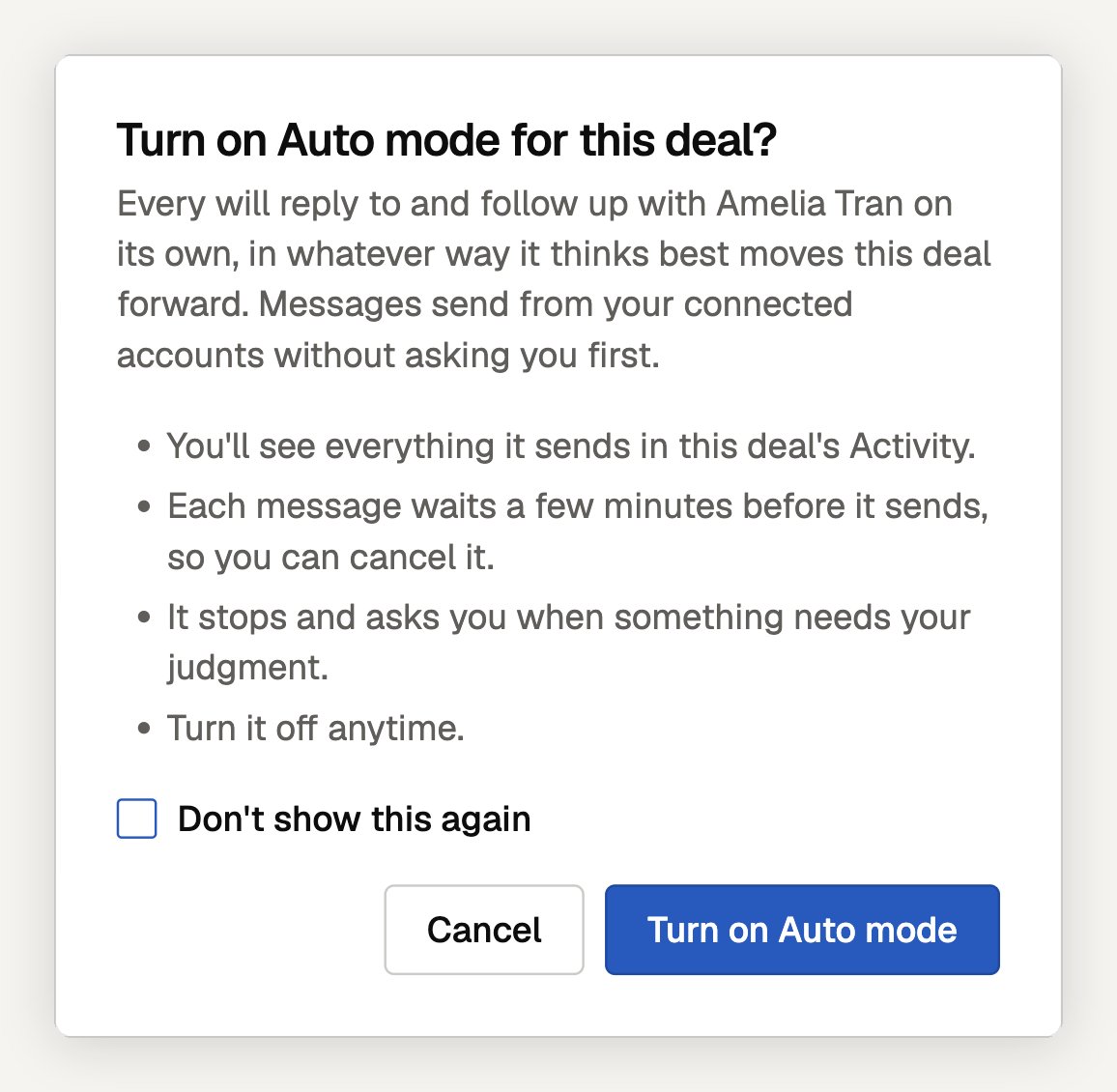
- Every will reply to and follow up with the deal’s contact on its own, in whatever way it thinks best moves the deal forward. Messages send from your connected accounts without asking you first.
- You’ll see everything it sends in the deal’s Activity.
- Each message waits a few minutes before it sends, so you can cancel it.
- It stops and asks you when something needs your judgment.
- You can turn it off anytime.
- Only the deal owner can turn Auto mode on. On a team workspace, a teammate who doesn’t own the deal sees Only the deal owner can turn on Auto mode.
- Anyone who can open the deal can turn it off.
What Auto mode sends
Auto mode replies and follows up on these channels, sending from the deal owner’s connected accounts:
X is never used.
Auto mode stays inside the conversation you already have:
- It only messages the deal’s contact, and only in an existing conversation on that channel where they’ve written to you. It doesn’t start new threads or message anyone else.
- It replies when they wrote last. When they haven’t answered, it sends at most two follow-ups.
- It holds a message instead of sending when the email thread includes other people, when their last message was an automatic reply, when the conversation changed since the plan was made, or after it has sent several messages in a row without you.
- It sends on weekdays during business hours in your time zone, and paces itself with a daily limit per channel.
Watching and stopping a send
When Auto mode has a message queued, the plan step (or a line under the Plan heading) says what it will send and when, for example Auto mode will send this reply at 3:42 PM (in 9 min).- Cancel stops that message.
- Send now sends it without waiting.
- Turning Auto mode off also cancels anything queued. While a send is waiting, the switch says so: Turning it off cancels the queued reply.
Pausing the agent
Pausing the agent on a deal pauses Auto mode too. Open the deal’s ⋯ menu → Pause agent. The deal shows Agent paused with a Resume button, and Auto mode can’t be turned on until you resume. Auto mode also turns itself off if the deal’s contact changes, so it never carries a grant from one person to another.Frequently asked questions
Does Auto mode cold-message people?
Does Auto mode cold-message people?
No. It only replies and follows up with the deal’s contact inside a conversation that already exists on Gmail, LinkedIn, or Instagram, where they’ve written to you before.
Will Auto mode send from my teammate's accounts?
Will Auto mode send from my teammate's accounts?
No. Messages send from the deal owner’s connected accounts, and only the owner can turn Auto mode on.
Can I undo a message Auto mode sent?
Can I undo a message Auto mode sent?
No. Once a message is delivered it can’t be unsent. That’s why each message waits a few minutes first: cancel it there if it isn’t right.
Why hasn't Auto mode sent anything?
Why hasn't Auto mode sent anything?
Check the plan step for a held message and its reason. Common ones: it’s waiting for their reply, there’s no existing conversation on that channel, the channel isn’t connected, it’s outside business hours, or the agent is paused on the deal.
Next Steps
Sales Pipeline
Plans, stage criteria, and deal activity
LinkedIn & Instagram
Connect the channels Auto mode can send on
Teams
Deal ownership on a multi-member workspace
Every Agent
How the agent asks before it sends in chat
Need help? Contact support at hello@every.ai