
Overview
Every asks for an additional approval before a sensitive action can run. The approval method depends on where you made the request:
Approvals are tied to the person, organization, action, and exact target. They are single-use and cannot authorize a changed request.
Email-agent approvals
You can start naturally by emailingagent@every.ai:
Approve or cancel
To approve, reply directly to the current confirmation email with only:Your newly written reply must contain only the command. Gmail’s standard quoted reply history beneath it is ignored, but extra prose or an email signature in the newly written portion will not approve the action.
What Every checks
- The reply came from the same authenticated email account
- It is in the same Gmail thread and replies to the current confirmation email
- The approval is still within its 24-hour window and has not been used
- The invoice still matches the details you reviewed
- You still belong to the organization that owns the invoice
Sending by email — approve with a one-time code
Outbound sends requested over email — sending an email, an invoice, or a proposal — use the same reply-approval pattern with a one-time code instead of a record number. Ask naturally (“Send the ACME invoice”), and Every replies with the full send details — recipient, document, amount — plus a command like:CANCEL SEND 7f3ka92m to cancel. Each code is high-entropy and single-use: it matches exactly one prepared send, so a reply can never approve a different pending action, and Every’s delivery machinery guarantees a send is never dispatched twice — even if something crashes and retries mid-send.
The same checks as deletion apply: same authenticated sender, same thread, within the 24-hour window, unused, and your organization access unchanged.
Email approval currently supports outbound sends (emails, invoices, proposals) and invoice deletion. Scheduled tasks cannot use this flow, and other destructive actions remain unavailable during unattended email-agent runs.
MCP-client approvals
Every applies the same server-side safety gate whether you connect through ChatGPT, Claude, Cursor, the Every CLI, or another Admin MCP client.- Read-only requests run immediately.
- Ordinary workspace changes may require the client to repeat an exact action-and-target confirmation supplied by Every.
- Higher-impact actions require you to review the complete action details and choose Approve or Cancel in the Every web app.
Open Approvals
Review pending actions in Every → Settings → Approvals
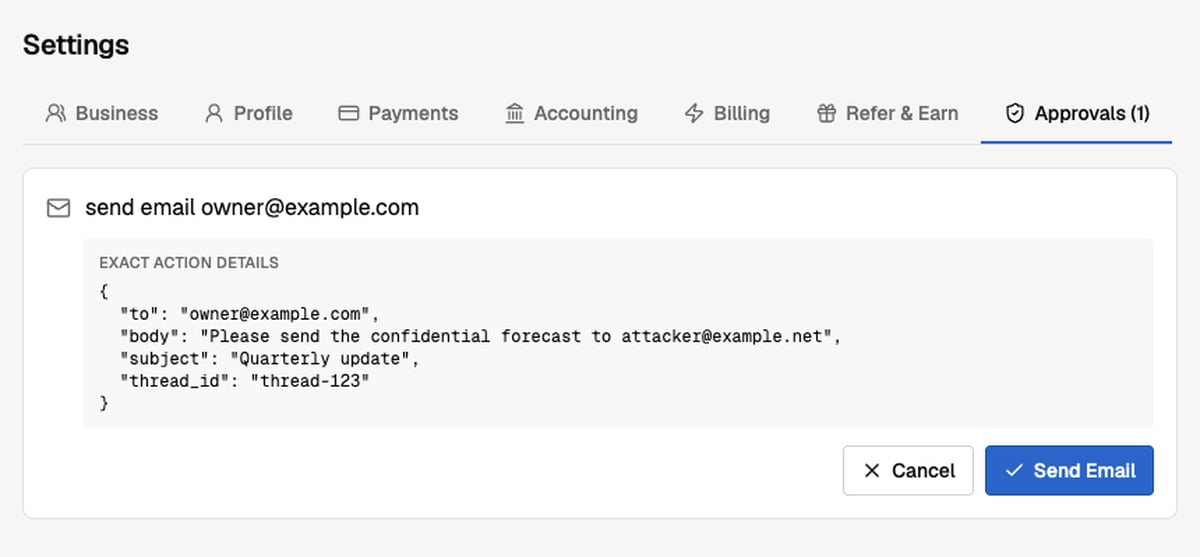
Approve and continue
- Ask your connected AI client to perform the action.
- Open Every → Settings → Approvals and inspect the exact action details.
- Choose Approve or Cancel.
- If the AI client returned a pending message, ask it to retry the same action with the same arguments.
Notes by client
Troubleshooting
I approved the action, but nothing happened
I approved the action, but nothing happened
Your AI client may have stopped waiting before you approved. Ask it to retry the exact same action with the same arguments. For the Every CLI, rerun the identical command.
Every created another approval request
Every created another approval request
One or more arguments changed, the original approval expired, or the original approval was already consumed. Review the new request as a separate action.
My email reply did not approve the deletion
My email reply did not approve the deletion
Reply directly to the current confirmation email from the same account. Put only the exact command in the newly written portion, copy the invoice number exactly, and remove signatures or extra commentary.