> ## Documentation Index
> Fetch the complete documentation index at: https://docs.every.ai/llms.txt
> Use this file to discover all available pages before exploring further.
# Approvals
> Review and approve sensitive actions requested by email, ChatGPT, Claude, the Every CLI, and other MCP clients
## Overview
Every asks for an additional approval before a sensitive action can run. The approval method depends on where you made the request:
| Where you asked | How you approve | Approval window |
| --------------------------------------------------------------- | ---------------------------------------------------------------------------------- | --------------- |
| Emailing `agent@every.ai` | Reply in the same email thread with the exact command Every provides | 24 hours |
| ChatGPT, Claude, Cursor, Every CLI, or another Admin MCP client | Review the action in the Every web app, then retry the identical request if needed | 10 minutes |
Approvals are tied to the person, organization, action, and exact target. They are single-use and cannot authorize a changed request.
## Email-agent approvals
You can start naturally by emailing `agent@every.ai`:
```text theme={"system"}
Delete invoice INV-123.
```
Every first resolves the invoice and emails back its organization, client, invoice number, amount, status, and ID. Nothing is deleted at that point.
### Approve or cancel
To approve, reply directly to the current confirmation email with only:
```text theme={"system"}
DELETE INVOICE INV-123
```
To cancel, reply with only:
```text theme={"system"}
CANCEL DELETE INVOICE INV-123
```
Copy the invoice number exactly as Every shows it. The command words are case-insensitive, but the invoice number is literal and case-sensitive.
Your newly written reply must contain only the command. Gmail's standard quoted reply history beneath it is ignored, but extra prose or an email signature in the newly written portion will not approve the action.
### What Every checks
* The reply came from the same authenticated email account
* It is in the same Gmail thread and replies to the current confirmation email
* The approval is still within its 24-hour window and has not been used
* The invoice still matches the details you reviewed
* You still belong to the organization that owns the invoice
Every emails the final result. Repeating a used command cannot delete the invoice again. If the invoice changed, disappeared, became ineligible for deletion, or your organization access changed, Every refuses the deletion and explains why.
Email approval currently supports **invoice deletion only**. Scheduled tasks cannot use this flow, and other sending or destructive actions remain unavailable during unattended email-agent runs.
## MCP-client approvals
Every applies the same server-side safety gate whether you connect through ChatGPT, Claude, Cursor, the Every CLI, or another **Admin MCP** client.
* Read-only requests run immediately.
* Ordinary workspace changes may require the client to repeat an exact action-and-target confirmation supplied by Every.
* Higher-impact actions require you to review the complete action details and choose **Approve** or **Cancel** in the Every web app.
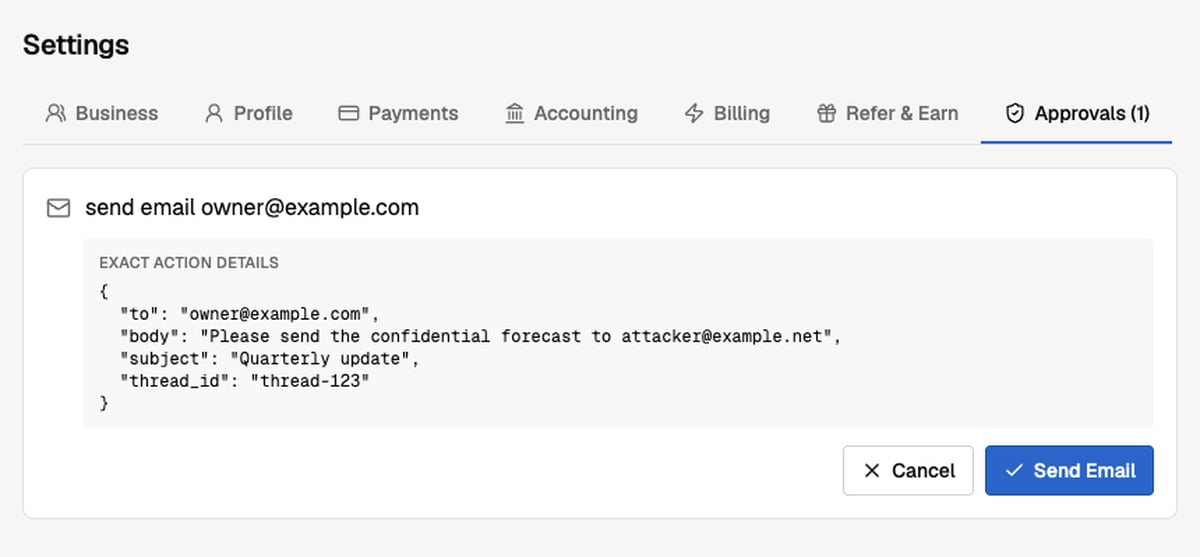
Review pending actions in Every → Settings → Approvals
The approval card shows the complete action details, not only a friendly summary. The synthetic example below deliberately includes a suspicious mismatch to show why you should inspect every field before approving.
 ### Approve and continue
1. Ask your connected AI client to perform the action.
2. Open [**Every → Settings → Approvals**](https://app.every.ai/settings/approvals) and inspect the exact action details.
3. Choose **Approve** or **Cancel**.
4. If the AI client returned a pending message, ask it to retry the **same action with the same arguments**.
Every may keep the original tool call open for up to 30 seconds. That wait is separate from the approval window: the approval remains valid for 10 minutes from creation and can be consumed only once. Changing any argument creates a different approval request. Denied, expired, or already-used approvals cannot execute the action.
MCP approvals are currently completed in the Every **web app**. Mobile approval for these external-client requests is not yet available.
### Notes by client
| Client | What to expect |
| ------------------------------- | --------------------------------------------------------------------------------------------------------------------------------------------------------- |
| **ChatGPT, Claude, and Cursor** | The client may keep waiting or return a pending message. After approving in Every, ask it to retry the exact action if it did not continue automatically. |
| **Every CLI 0.6.3 or newer** | Rerun the identical command, including the same arguments and safety flags. The CLI never automatically retries a human-approved action. |
| **Other MCP clients** | Presentation and timeout behavior vary. Preserve the exact arguments when retrying after approval. |
The customer-facing **Client MCP** uses a separate, restricted trust model. The Admin MCP approval flow described here does not apply to it.
## Troubleshooting
Your AI client may have stopped waiting before you approved. Ask it to retry the exact same action with the same arguments. For the Every CLI, rerun the identical command.
One or more arguments changed, the original approval expired, or the original approval was already consumed. Review the new request as a separate action.
Reply directly to the current confirmation email from the same account. Put only the exact command in the newly written portion, copy the invoice number exactly, and remove signatures or extra commentary.
### Approve and continue
1. Ask your connected AI client to perform the action.
2. Open [**Every → Settings → Approvals**](https://app.every.ai/settings/approvals) and inspect the exact action details.
3. Choose **Approve** or **Cancel**.
4. If the AI client returned a pending message, ask it to retry the **same action with the same arguments**.
Every may keep the original tool call open for up to 30 seconds. That wait is separate from the approval window: the approval remains valid for 10 minutes from creation and can be consumed only once. Changing any argument creates a different approval request. Denied, expired, or already-used approvals cannot execute the action.
MCP approvals are currently completed in the Every **web app**. Mobile approval for these external-client requests is not yet available.
### Notes by client
| Client | What to expect |
| ------------------------------- | --------------------------------------------------------------------------------------------------------------------------------------------------------- |
| **ChatGPT, Claude, and Cursor** | The client may keep waiting or return a pending message. After approving in Every, ask it to retry the exact action if it did not continue automatically. |
| **Every CLI 0.6.3 or newer** | Rerun the identical command, including the same arguments and safety flags. The CLI never automatically retries a human-approved action. |
| **Other MCP clients** | Presentation and timeout behavior vary. Preserve the exact arguments when retrying after approval. |
The customer-facing **Client MCP** uses a separate, restricted trust model. The Admin MCP approval flow described here does not apply to it.
## Troubleshooting
Your AI client may have stopped waiting before you approved. Ask it to retry the exact same action with the same arguments. For the Every CLI, rerun the identical command.
One or more arguments changed, the original approval expired, or the original approval was already consumed. Review the new request as a separate action.
Reply directly to the current confirmation email from the same account. Put only the exact command in the newly written portion, copy the invoice number exactly, and remove signatures or extra commentary.