> ## Documentation Index
> Fetch the complete documentation index at: https://docs.every.ai/llms.txt
> Use this file to discover all available pages before exploring further.
# LinkedIn & Instagram
> Connect LinkedIn and Instagram so your connections, the accounts you follow, and your recent messages keep your people and deals up to date
## Overview
Connect LinkedIn and Instagram so the conversations you have there keep your deals current, the same way Gmail does. Every brings in your contacts, reads your recent messages, and attaches each conversation to the right person and deal.
**What You Can Do:**
* Add your LinkedIn connections and the Instagram accounts you follow to [People](/network/people), matched to records you already have
* Sync your recent LinkedIn messages and Instagram DMs to the right person and deal
* Let deals update their activity, next steps, and stage from those conversations
* Send a LinkedIn reply from a deal, or let [Auto mode](/prospecting/auto-mode) reply and follow up for you
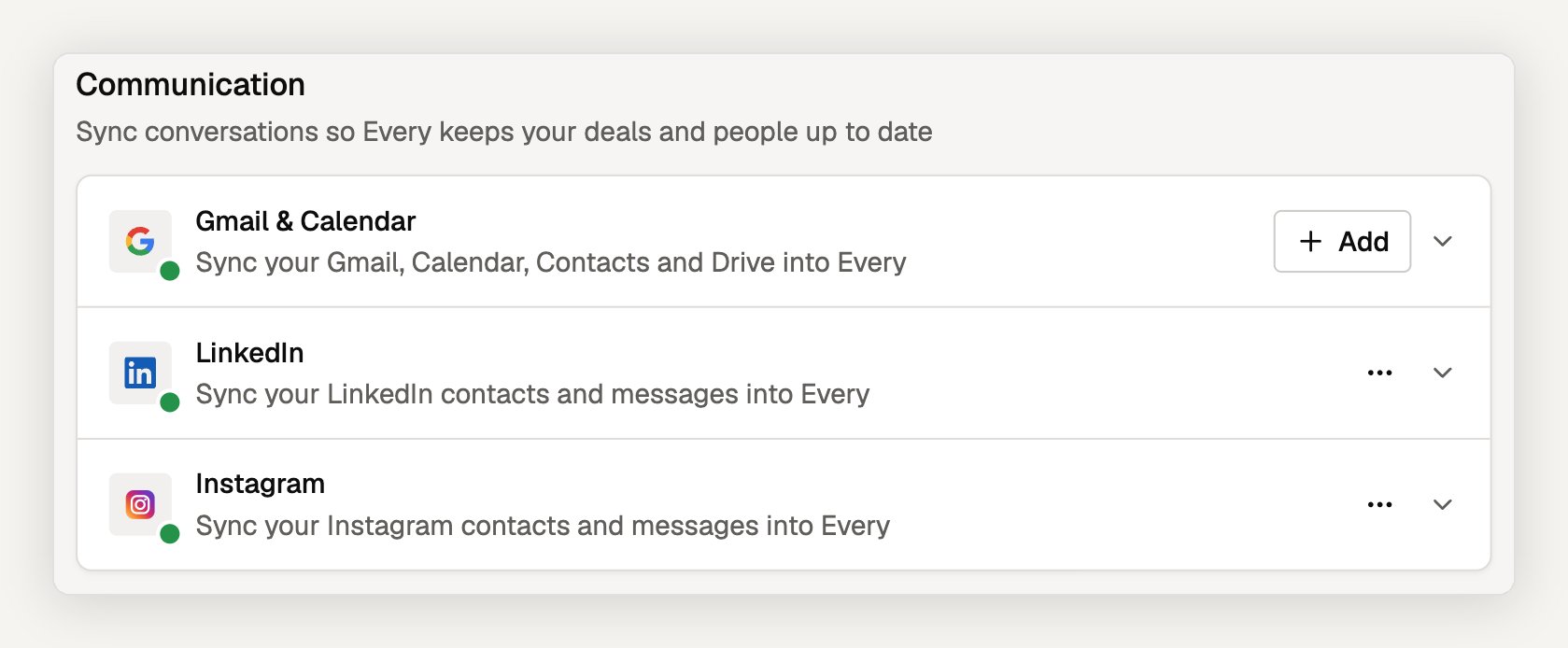
LinkedIn and Instagram are in the **Communication** section, next to Gmail & Calendar
 ## Connecting LinkedIn or Instagram
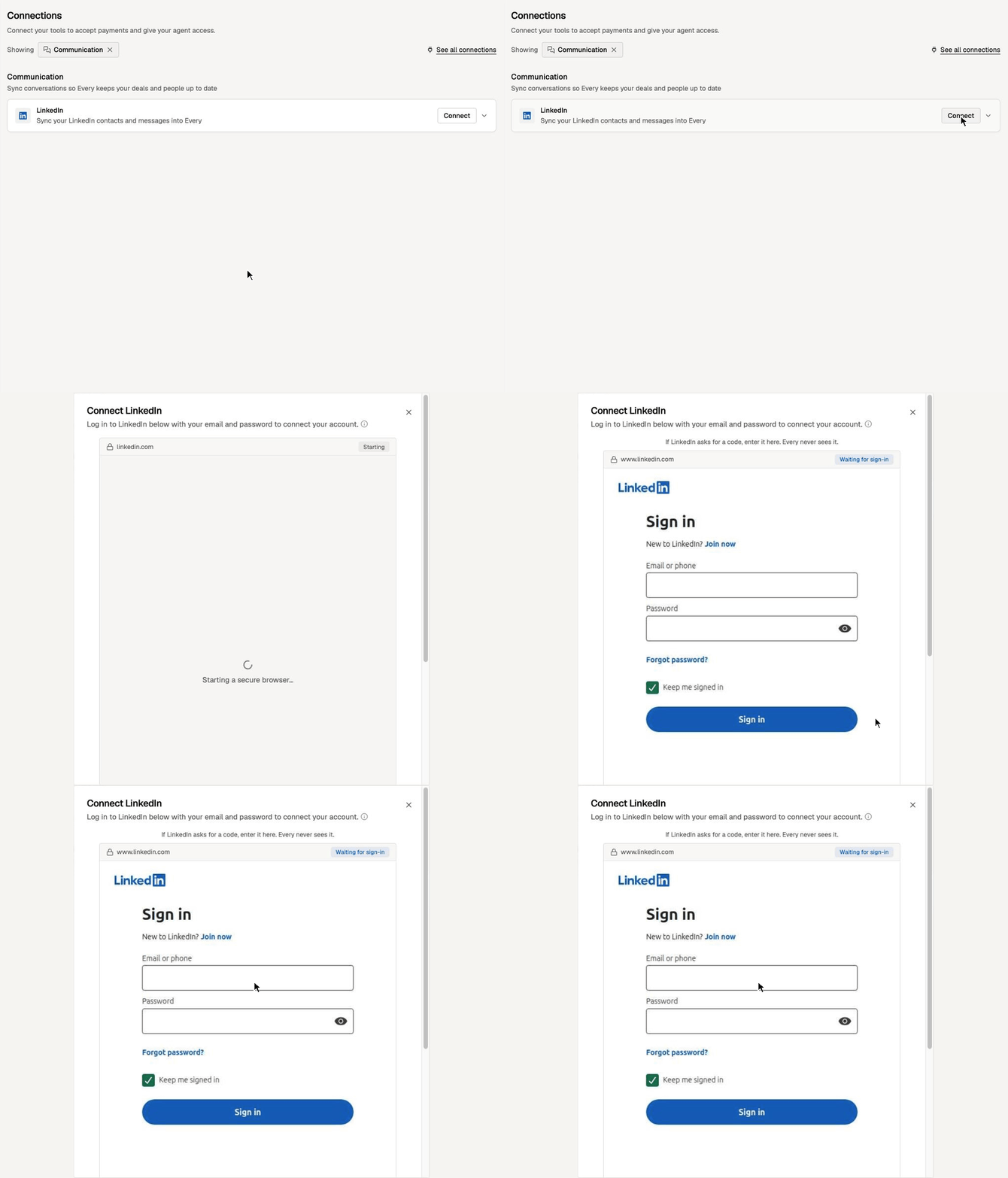
Go to [**Agent → Connections**](https://app.every.ai/agent/connections) → **Communication** → find the **LinkedIn** or **Instagram** row → **Connect**.
Every opens a secure browser it hosts, inside a dialog. You sign in on LinkedIn's or Instagram's own page, including any two-step verification code they ask for. When the sign-in finishes, the dialog closes and the first import starts.
## Connecting LinkedIn or Instagram
Go to [**Agent → Connections**](https://app.every.ai/agent/connections) → **Communication** → find the **LinkedIn** or **Instagram** row → **Connect**.
Every opens a secure browser it hosts, inside a dialog. You sign in on LinkedIn's or Instagram's own page, including any two-step verification code they ask for. When the sign-in finishes, the dialog closes and the first import starts.
 **What Every keeps:**
* Every doesn't store your password. You type it into LinkedIn's or Instagram's page, not into Every.
* Every keeps only the signed-in session, encrypted, and uses it to run your syncs and the sends you ask for.
* **Disconnect** deletes Every's copy of the session. It doesn't sign you out of LinkedIn or Instagram.
On LinkedIn, **Sign in with Google** and **Sign in with Apple** aren't available in the connect window. If you normally use one of those, set a LinkedIn password first, then sign in with your email and that password.
### Teams
Each teammate connects their own account. A connection belongs to the person who made it: only they can sync or send from it. The people, messages, and deal activity it imports are shared with your workspace.
Open a network's row to see which teammates have connected under **Team members**.
## What syncs
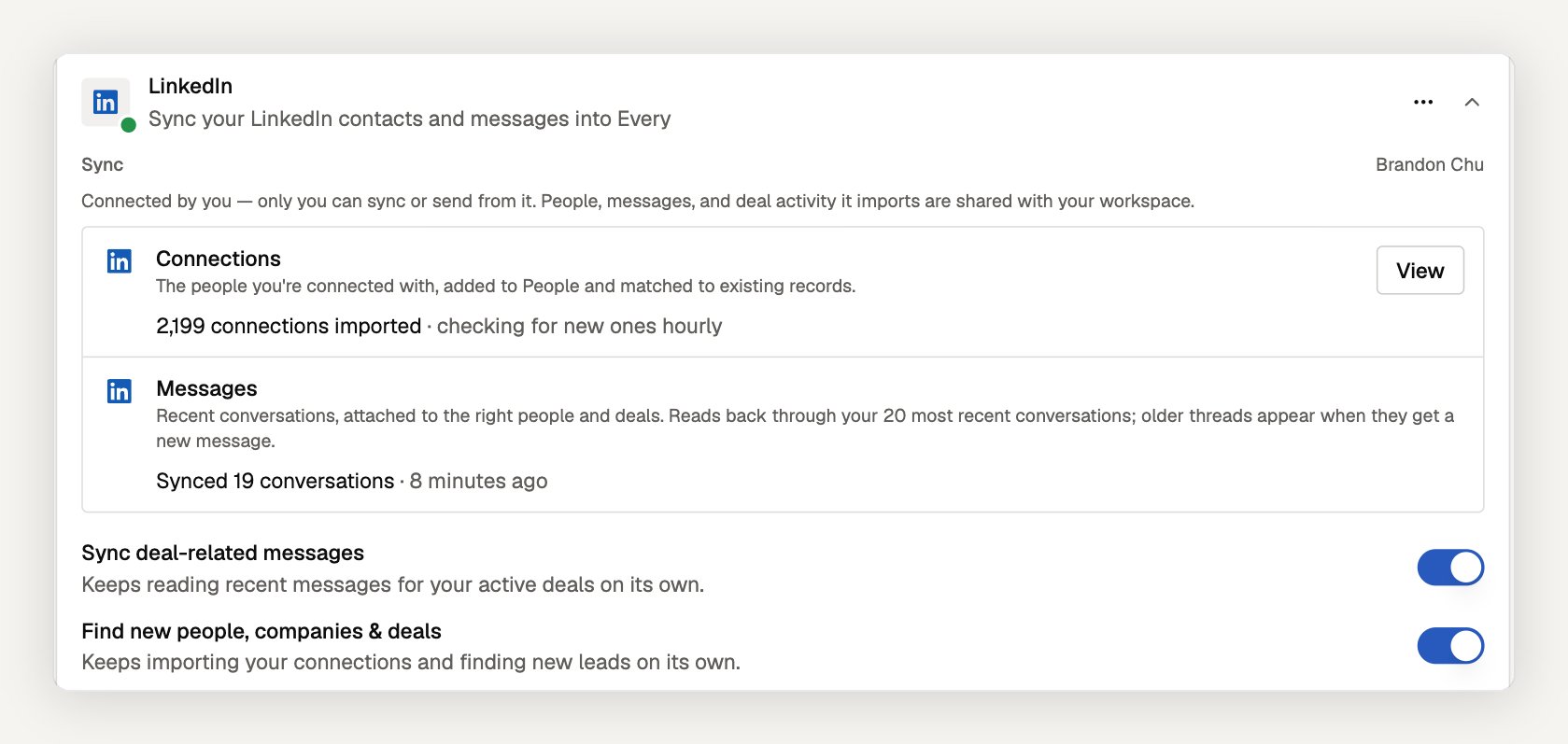
Open a connected row to see its sync status. Each network has two parts: your contacts and your messages.
**What Every keeps:**
* Every doesn't store your password. You type it into LinkedIn's or Instagram's page, not into Every.
* Every keeps only the signed-in session, encrypted, and uses it to run your syncs and the sends you ask for.
* **Disconnect** deletes Every's copy of the session. It doesn't sign you out of LinkedIn or Instagram.
On LinkedIn, **Sign in with Google** and **Sign in with Apple** aren't available in the connect window. If you normally use one of those, set a LinkedIn password first, then sign in with your email and that password.
### Teams
Each teammate connects their own account. A connection belongs to the person who made it: only they can sync or send from it. The people, messages, and deal activity it imports are shared with your workspace.
Open a network's row to see which teammates have connected under **Team members**.
## What syncs
Open a connected row to see its sync status. Each network has two parts: your contacts and your messages.
 | | LinkedIn | Instagram |
| - | - | - |
| **Contacts** | **Connections** — the people you're connected with | **Following** — the accounts you follow (not your followers) |
| **Messages** | **Messages** — your recent conversations | **DMs** — your recent conversations |
**Contacts** are added to [People](/network/people) and matched to existing records, so someone you already have in Every isn't added twice. The row shows how many were imported and how often Every checks for new ones. Select **View** to open People filtered to that import.
**Messages** attach to the right person and deal. The first sync reads back through your **20 most recent conversations** on each network. Older threads appear once they get a new message.
| | LinkedIn | Instagram |
| - | - | - |
| **Contacts** | **Connections** — the people you're connected with | **Following** — the accounts you follow (not your followers) |
| **Messages** | **Messages** — your recent conversations | **DMs** — your recent conversations |
**Contacts** are added to [People](/network/people) and matched to existing records, so someone you already have in Every isn't added twice. The row shows how many were imported and how often Every checks for new ones. Select **View** to open People filtered to that import.
**Messages** attach to the right person and deal. The first sync reads back through your **20 most recent conversations** on each network. Older threads appear once they get a new message.
 ### Sync switches
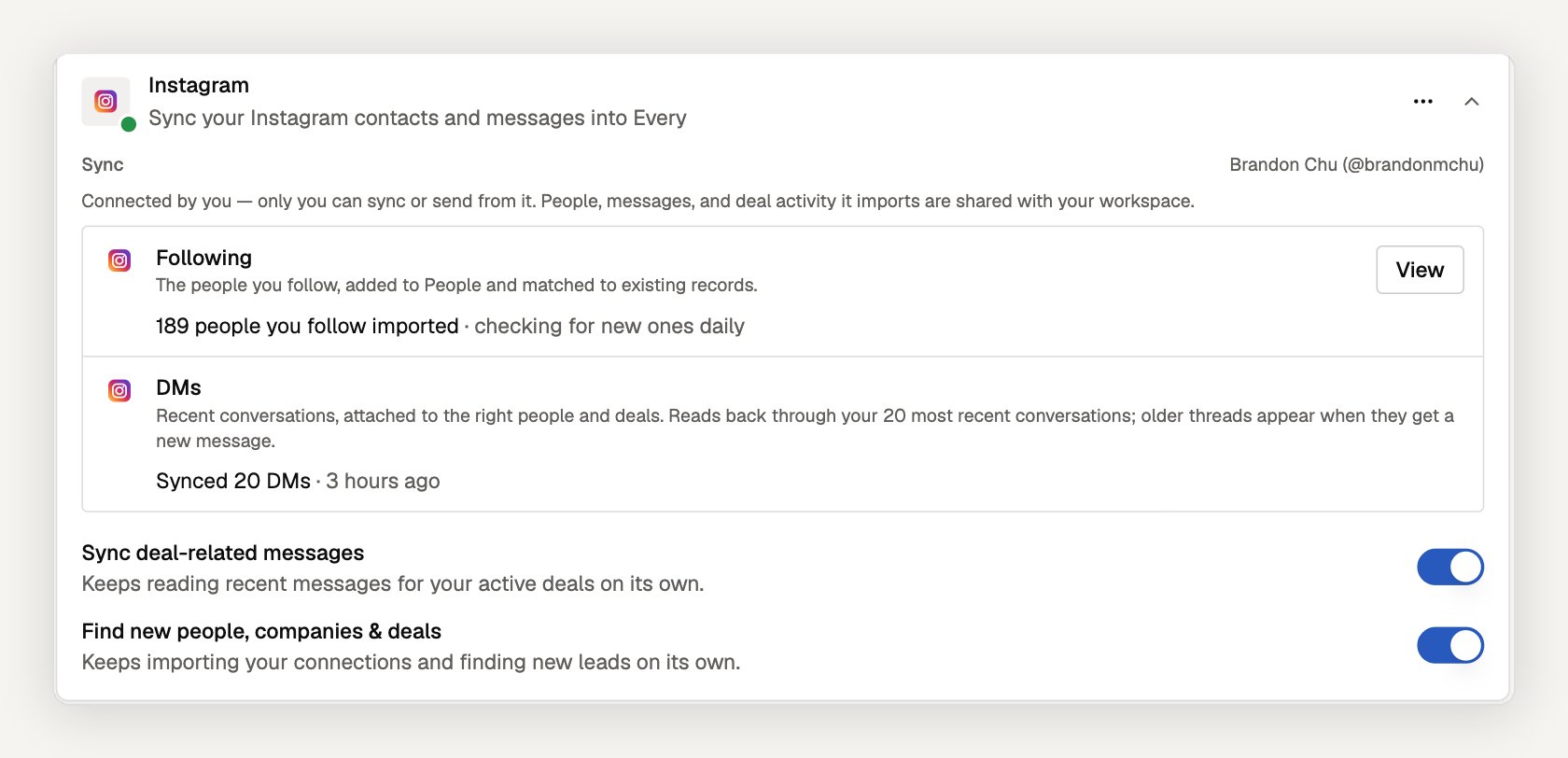
Each network has two switches, and both start on:
| Switch | What it does |
| - | - |
| **Sync deal-related messages** | Keeps reading recent messages for your active deals on its own, so their activity, next steps, and stage stay current. |
| **Find new people, companies & deals** | Keeps importing your connections (LinkedIn) or the accounts you follow (Instagram) and finding new leads on its own. |
Turn a switch off to stop that part from running on its own. Your connection stays in place, and what was already imported stays in Every.
### More options
The **⋯** menu on a connected row has:
* **Test connection** — checks that the saved session still works
* **View sync history** — recent contact and message syncs
* **Open profile on LinkedIn** / **Open profile on Instagram**
* **Disconnect**
## LinkedIn and Instagram in your deals
Incoming and outgoing messages are attached to the right person and deal. Every reads new messages as they arrive and updates the deal's activity, next steps, and stage, so the board reflects where each conversation stands and which channel reaches each person.
When a deal's next step is a message on LinkedIn or Instagram, Every drafts it for that channel:
* **LinkedIn:** select **Send via Every** on the plan step. Every shows the message and recipient, and sends it from your connected LinkedIn account when you confirm.
* **Instagram:** select **Copy message** and send it from Instagram yourself.
With [Auto mode](/prospecting/auto-mode) on for a deal, Every can reply and follow up on its own on LinkedIn and Instagram, as well as Gmail.
See [Sales Pipeline](/prospecting/pipeline) for how deals, plans, and activity fit together.
**Ask Every Agent:**
* "What did Sarah Chen last say to me on LinkedIn?"
* "Sync my LinkedIn messages into my deals"
* "Import the people I follow on Instagram"
## Frequently asked questions
No. You sign in on LinkedIn's or Instagram's own page inside a secure browser Every hosts. Every keeps only the signed-in session, encrypted, and uses it to run your syncs.
Following. Every imports the accounts you follow, not the accounts that follow you.
Every reads back through your 20 most recent conversations on each network. An older thread shows up as soon as it gets a new message.
No. Only the person who connected an account can sync or send from it. Teammates see the people, messages, and deal activity it imports, because those are shared with the workspace.
Not by hand from the deal yet. Instagram steps show **Copy message** so you can send from Instagram. Auto mode can send Instagram replies and follow-ups on deals where you turn it on.
They stay in People. Disconnecting deletes Every's copy of your session and stops future syncs; it doesn't remove records Every already added.
## Troubleshooting
**Row shows "Reconnect needed":** The saved session stopped working, for example because LinkedIn or Instagram signed it out. Select **Reconnect** and sign in again. Syncs resume from where they stopped.
**LinkedIn or Instagram asked for a security check:** Open LinkedIn or Instagram, complete the check there, then select **Reconnect** in Every.
**"Stopped early":** LinkedIn or Instagram slowed the sync down. Every picks up where it left off on the next run.
**Not available in your region:** The row says so when Every can't connect that network from your region yet. For LinkedIn, the row offers the Every Chrome extension as another way to sync.
## Next Steps
Let Every reply and follow up on a deal without asking first
See how messages update deals, plans, and stages
Connect one or more Gmail accounts and your calendar
Review the people your connections brought in
**Need help?** Contact support at [hello@every.ai](mailto:hello@every.ai)
### Sync switches
Each network has two switches, and both start on:
| Switch | What it does |
| - | - |
| **Sync deal-related messages** | Keeps reading recent messages for your active deals on its own, so their activity, next steps, and stage stay current. |
| **Find new people, companies & deals** | Keeps importing your connections (LinkedIn) or the accounts you follow (Instagram) and finding new leads on its own. |
Turn a switch off to stop that part from running on its own. Your connection stays in place, and what was already imported stays in Every.
### More options
The **⋯** menu on a connected row has:
* **Test connection** — checks that the saved session still works
* **View sync history** — recent contact and message syncs
* **Open profile on LinkedIn** / **Open profile on Instagram**
* **Disconnect**
## LinkedIn and Instagram in your deals
Incoming and outgoing messages are attached to the right person and deal. Every reads new messages as they arrive and updates the deal's activity, next steps, and stage, so the board reflects where each conversation stands and which channel reaches each person.
When a deal's next step is a message on LinkedIn or Instagram, Every drafts it for that channel:
* **LinkedIn:** select **Send via Every** on the plan step. Every shows the message and recipient, and sends it from your connected LinkedIn account when you confirm.
* **Instagram:** select **Copy message** and send it from Instagram yourself.
With [Auto mode](/prospecting/auto-mode) on for a deal, Every can reply and follow up on its own on LinkedIn and Instagram, as well as Gmail.
See [Sales Pipeline](/prospecting/pipeline) for how deals, plans, and activity fit together.
**Ask Every Agent:**
* "What did Sarah Chen last say to me on LinkedIn?"
* "Sync my LinkedIn messages into my deals"
* "Import the people I follow on Instagram"
## Frequently asked questions
No. You sign in on LinkedIn's or Instagram's own page inside a secure browser Every hosts. Every keeps only the signed-in session, encrypted, and uses it to run your syncs.
Following. Every imports the accounts you follow, not the accounts that follow you.
Every reads back through your 20 most recent conversations on each network. An older thread shows up as soon as it gets a new message.
No. Only the person who connected an account can sync or send from it. Teammates see the people, messages, and deal activity it imports, because those are shared with the workspace.
Not by hand from the deal yet. Instagram steps show **Copy message** so you can send from Instagram. Auto mode can send Instagram replies and follow-ups on deals where you turn it on.
They stay in People. Disconnecting deletes Every's copy of your session and stops future syncs; it doesn't remove records Every already added.
## Troubleshooting
**Row shows "Reconnect needed":** The saved session stopped working, for example because LinkedIn or Instagram signed it out. Select **Reconnect** and sign in again. Syncs resume from where they stopped.
**LinkedIn or Instagram asked for a security check:** Open LinkedIn or Instagram, complete the check there, then select **Reconnect** in Every.
**"Stopped early":** LinkedIn or Instagram slowed the sync down. Every picks up where it left off on the next run.
**Not available in your region:** The row says so when Every can't connect that network from your region yet. For LinkedIn, the row offers the Every Chrome extension as another way to sync.
## Next Steps
Let Every reply and follow up on a deal without asking first
See how messages update deals, plans, and stages
Connect one or more Gmail accounts and your calendar
Review the people your connections brought in
**Need help?** Contact support at [hello@every.ai](mailto:hello@every.ai)